How to Save Money and Speed Up FBA Check-Ins With Optimized Shipments

1
min read
September 10, 2026
Shipping inventory to Amazon can get expensive pretty quickly. You send in a box, pay the placement fee, and then Amazon may turn around and move that inventory to other fulfillment centers anyway. Meanwhile, you’re hit with check-in lag and FC transfers before anything is actually ready to sell.
But there’s a way to skip some of that extra cost and waiting: Amazon optimized shipments.
Optimized shipments can eliminate placement fees, cut down on FC transfers, and get your products checked in faster. And with Boxem, creating an optimized shipment is easier than ever.
What’s an Amazon Optimized Shipment?
An optimized shipment uses five or more identical boxes containing the same product or mix of products. Instead of sending everything to one warehouse and letting Amazon move the inventory around, you spread it evenly across multiple boxes that can go to different fulfillment centers.
That means less FC transfer work for Amazon, which can lead to faster check-in times and faster Prime eligibility.
The trick is to buy inventory in quantities that divide easily by five. Buying 20, 25, 50, or 100 units makes it easy to split your inventory evenly.
Why Faster Check-ins Are a Big Deal
The savings aren't just about the placement fees.
When you send all your inventory to a single fulfillment center, Amazon may later transfer some of it to other facilities. That adds another waiting period before your inventory is available for sale.
Optimized shipments cut down on that back-and-forth because your inventory is already spread out across different fulfillment centers
Based on feedback from Boxem users, products sent through optimized shipments have become Prime eligible about 33% faster on average.
Faster check-ins mean your products can start selling sooner, so you get your money back faster and can put that cash toward your next sourcing opportunity.
The Real Difference:
Set Up Your Shipment For Success
Start by making sure your products are properly listed for FBA. Inside Boxem, visit the List FBA page, add your ASINs, create SKUs, enter your buy costs and other product information, and submit the listings to Amazon.
Amazon typically takes 15 to 60 minutes to make the listings active. While you wait, you can get your inventory ready by organizing your products, polybagging anything that needs it, and prepping your boxes.
Once the listings are active, create a new shipment in Boxem and add the products you want to send in. This is where you’ll enter the quantities, along with any required prep information, expiration dates, and other product details.
For example, you might have:
- 50 units of GAP Men's Soft Crewneck T-Shirts
- 100 units of Lego Statue of Liberty Building Sets
- 150 units of Native Deodorant
One important thing to remember: optimized shipments cannot be used with 2D barcodes, so make sure that option isn’t selected when creating your shipment.
Once everything is added, Boxem shows your total shipment profit, and you can submit the products to Amazon.
Pack, Optimize, and Ship Your Boxes
After submitting your products, it’s time to prep and pack everything. An optimized shipment needs at least five identical boxes, so if you start with one box, you’ll create four more.
From there, select all five boxes and let Boxem split the inventory evenly. For example, 100 units of one product becomes 20 units per box, while 50 units becomes 10 per box.

No calculator, and no need to enter the same quantities five times. Boxem does the math for you.
Once you submit your boxes, Boxem will show you the placement options available for your shipment. The optimized option is clearly marked, and you’ll see $0 in placement fees when you select it.
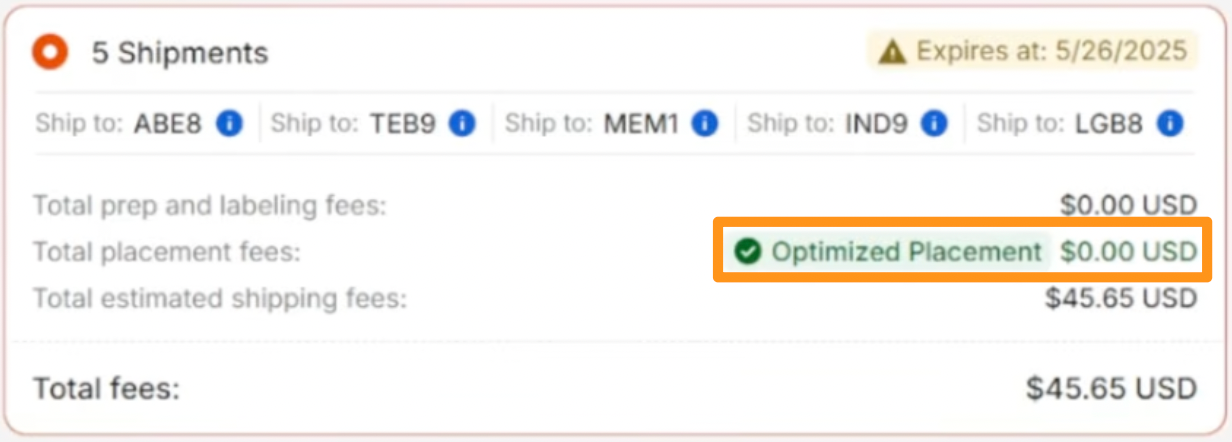
After choosing optimized placement, confirm the shipment and print your required labels. Each box gets its UPS shipping label and FBA box label on the outside.
And that’s it. You can create, pack, label, and complete the entire shipment in Boxem without jumping between tabs or moving over to Amazon Seller Central. From there, all that’s left is getting those boxes to UPS and watching how quickly your inventory gets checked in once it reaches Amazon.
Ready to Ship Smarter?
If you’re regularly buying inventory in larger quantities, optimized shipments are worth adding to your routine. You’ll spend less time dealing with shipments, save money on placement fees, and get your inventory selling faster. That means more time for sourcing and more cash back in the business for your next buy.
Don’t overthink it. Buy in quantities that divide by five, build five identical boxes, and let Boxem handle the rest. It’s really that simple.
Want to see how to create an optimized shipment with Boxem, step by step? Check out the full guide on YouTube for free:
Subscribe to our Weekly Newsletter
No spam, notifications only about new products, updates.


Get Started Today,
Ship Smarter with Boxem
Boxem streamlines all operations so you can focus on what truly matters.
.png)