How to Get Ungated to Sell Toys on Amazon in 2026

1
min read
September 16, 2026
With the Q4 holiday season around the corner, toy sourcing can get exciting fast. A popular brand goes on sale, the sales history looks promising, and the numbers show a healthy profit. Just one problem remains: Amazon won't let you sell it.
The good news is that getting approved doesn't have to be complicated. Even if your seller account is brand new, you can still get ungated with the right purchase, documentation, and a little persistence.
Start With Products You Can Already Sell
Before spending money on an ungating order, check whether the products you want to sell are already available to your account. Some brands are auto-ungated for new sellers, meaning you don't need an approval application or invoice.
For Boxem users, the Suggested ASINs List in the Bulk Ungating tool is a great place to start. It scans hundreds of ASINs likely to be auto-ungated for your account, giving you a quick way to find products you can potentially source and list without manually checking each one.
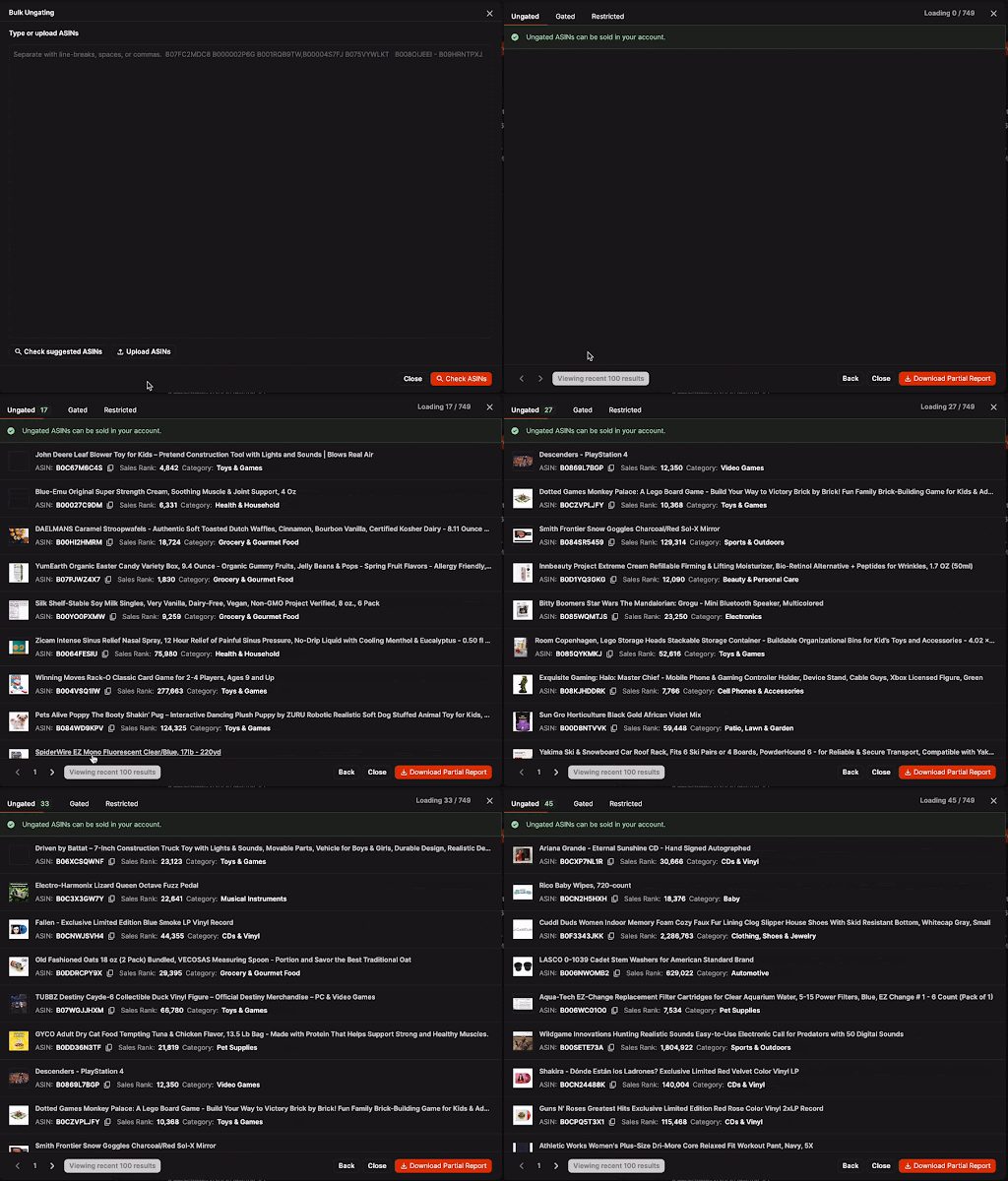
Starting with products you can already sell means there's no reason to wait for an approval before making your first sales.
That early momentum matters. Once inventory starts selling, money comes back into the business and can be used to buy more stock. Plus, building sales history with Amazon helps unlock additional products to sell over time.
A Gated Product Isn't a Dead End
If a toy you're interested in requires approval, don't write it off immediately. Amazon is simply looking for documentation showing that the inventory comes from a legitimate source.
In many cases, a qualifying purchase can help sellers get approved for both a specific brand and the broader category.
For example, purchasing Paw Patrol toys could potentially help you get approved for the brand while also satisfying the requirements for Amazon’s Toys & Games category.
That's one invoice unlocking multiple opportunities.
Choose a Retailer Amazon Recognizes
Where the products come from matters just as much as what you buy.
When possible, buy directly from the brand. If the brand sells its products through major retailers, those can also be good sources for an ungating purchase.
For toys, examples include:
- Target
- Walmart
- Best Buy
The more familiar the supplier is to Amazon, the fewer questions there are about where the inventory came from.
A large wholesale distributor can work, too, particularly if it's a well-known supplier. A small local wholesaler may sell perfectly legitimate products, but Amazon may not recognize its invoices or consider the documentation sufficient for approval.
The Ungating Order Checklist
There's no need to complicate an ungating purchase. If your goal is to get approved as cheaply as possible, find a low-cost qualifying toy and buy the required number of units.
Here's how to approach it:
- Find an inexpensive product. Search Target (or another trusted retailer) for a small toy you're currently gated from selling. For example, a Paw Patrol Lights & Sound Bubble Wand.
- Order the required number of units. Amazon often requires 10 units, but you can check the product’s application page in Seller Central to be sure.
- Enter your business information carefully. The name and shipping or billing address used for the purchase should exactly match the information on your Amazon Seller account.
- Keep all of your documentation. Save the order confirmation or invoice and download it as a PDF. Name the file clearly, such as Paw Patrol Invoice September 2026, so it's easy to find if you need to resubmit it.
And that’s it. With your order placed and documentation saved, you're ready to submit your ungating request.
Don't Let Rejections Stop You
An ungating denial doesn't necessarily mean the purchase or invoice failed. New sellers often submit an application once, get rejected, and move on. That's a mistake.
In reality, it often takes multiple submissions to get approved.
If Amazon declines the request, use the next submission to provide the reviewer with new information.
You can also try reordering the documents in your PDF. If the first version included the order confirmation, shipping information, delivery confirmation, and product photos in that order, try putting the product photos first when you resubmit.
Amazon may also say something is missing when the invoice clearly includes it. If that happens, make it easy to find. Highlight or circle the product quantity, address, supplier information, or whatever detail Amazon says is missing before resubmitting the documentation.
The goal is to give the application a fresh presentation and make sure the important info gets another look.
Your Next Sourcing Opportunity Is Waiting
Getting ungated for toys may seem like a big hurdle at first, but the process is pretty straightforward once you know what Amazon is looking for.
Start with a trusted retailer, keep your paperwork organized, and don't let rejections stop you from trying again. Each approval gives you access to more products you can source and more chances to find profitable inventory.
Keep working through the process, and you'll spend less time checking what you're gated on and more time finding products you can actually sell.
Subscribe to our Weekly Newsletter
No spam, notifications only about new products, updates.
.png)

Get Started Today,
Ship Smarter with Boxem
Boxem streamlines all operations so you can focus on what truly matters.
.png)