How to Get Ungated to Sell Beauty Products on Amazon in 2026

1
min read
August 10, 2026
If you've spent any time sourcing beauty products, you've probably run into a frustrating problem. You find a great deal, only to discover Amazon won't let you list the product because you're gated.
The good news is that getting ungated in beauty is much simpler than most sellers think. Even a brand-new seller account can get approved with the right paperwork and a little persistence.
Start by Getting Some Brands Approved for Free
Many beginner-friendly brands require little or no additional paperwork.
For Boxem users, the Suggested ASINs List in the Bulk Ungating tool is a great place to start. It bulk-scans hundreds of ASINs that are likely to be auto-ungated for your account, helping you find inventory you can start sourcing without spending time manually checking listings.
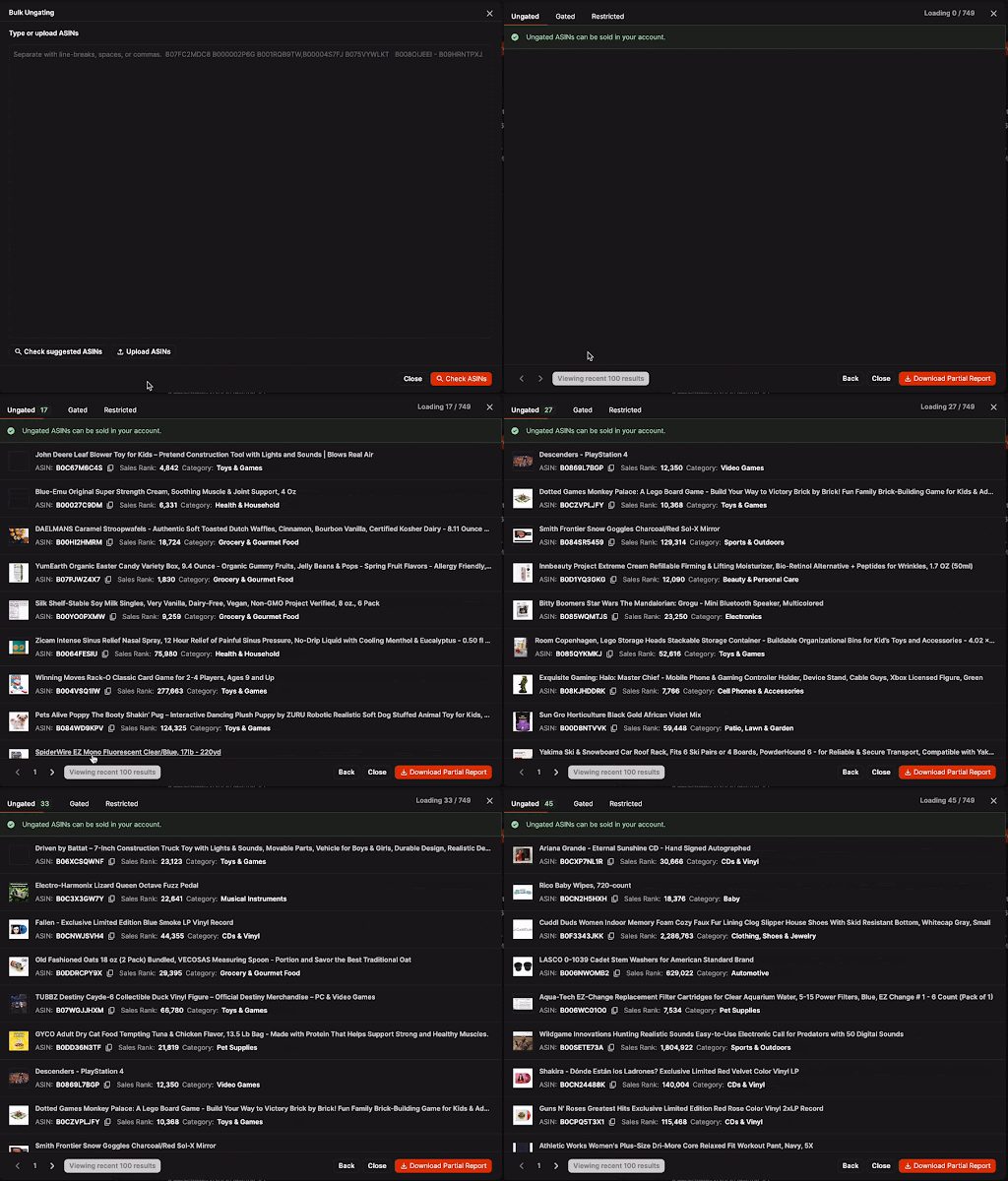
Starting with these products lets you begin making sales immediately while you're working through approvals for larger brands and categories.
That's important because experience matters. The sooner products sell, the sooner cash starts coming back into your business, so you can buy more inventory instead of waiting around for approvals. Plus, building sales history with Amazon will gradually unlock even more products to sell.
Being Gated Doesn't Mean You Can't Sell
Just because you have to apply for approval to list a product doesn’t mean you can’t sell it. It simply means Amazon wants proof that you're buying authentic inventory from a trusted source.
The approval process exists to help keep counterfeit products off the marketplace, protecting both customers and legitimate sellers.
For beauty products, one invoice can often do double duty. Buying products from a brand like Burt's Bees, for example, may help you get approved for both the brand and the entire beauty category at the same time. That's one invoice unlocking multiple opportunities.
Where You Buy Matters
Amazon wants to see invoices from businesses they already trust. That means buying directly from the brand whenever possible is usually the strongest option.
If that's not available, stick with major beauty retailers like:
- Target
- Walmart
- Walgreens
- CVS
- Ulta
The easier you make it for Amazon to recognize the supplier, the smoother the approval process usually goes.
Large wholesale distributors can also work, especially if they're well known. Small local wholesalers aren't necessarily a bad business decision, but Amazon may not recognize their documentation. This can make the approval process much harder than it needs to be.
The Ungating Checklist
If your goal is getting approved as cheaply as possible, look for an inexpensive product and purchase 10 units. Here's a simple step-by-step:
- Find a low-cost item. Search a trusted retailer's website for a beauty brand you want to get approved for. For example, a Burt's Bees Calming Sheet Mask.
- Order exactly 10 units. Amazon's requirement is often 10 units of the same item. Buying five or nine usually won't meet the requirement.
- Use your business details at checkout. The name and shipping or billing address on the order should exactly match the information for your Amazon Seller account.
- Save your order confirmation. Download the invoice or order confirmation as a PDF so it's ready to submit with your approval request. Giving the file a simple name, like "Burt’s Bees Invoice July 2026," also helps keep everything organized if you need to resubmit later.
That's all there is to it. Once your order is placed, you'll have the documentation Amazon typically requests to review your application.
What to Do If Amazon Rejects Your Application
This is where many new sellers quit. They get one rejection and assume the invoice didn't work.
In reality, it takes multiple submissions on average to actually get approved.
Instead of giving up, strengthen your submission each time you apply, giving Amazon a new reason to approve the request.
Another simple trick is to reorganize your PDF before resubmitting it. Instead of leading with the order confirmation, try putting the product photos first, followed by the invoice, shipping confirmation, and delivery confirmation.
If Amazon says information is missing but it's clearly on the invoice, highlight or circle the relevant details before uploading it again. Sometimes making the important information easier to spot is all it takes to move your application forward.
The goal is to make sure Amazon reviews the submission as a new application rather than assuming it's identical to the last one.
Your Next Approval Is Closer Than You Think
Getting ungated can feel intimidating at first, but the process is usually much simpler than it looks. Buy from retailers Amazon trusts, keep your documentation organized, and don't get discouraged if your first submissions aren’t approved.
Every new approval opens the door to more sourcing opportunities and more potential profit. Stick with the process, and before long, you'll spend less time worrying about being gated and more time finding your next profitable product.
Subscribe to our Weekly Newsletter
No spam, notifications only about new products, updates.
.png)

Get Started Today,
Ship Smarter with Boxem
Boxem streamlines all operations so you can focus on what truly matters.
.png)