How to Get Ungated on Amazon: The 2026 Step-by-Step Brand Approval Guide

1
min read
May 28, 2026
When an Amazon Seller account is first opened, it feels like being invited to the world’s biggest party, only to realize you aren’t invited. You try to list anything, and it usually results in the dreaded Apply to Sell button appearing.
This is a common frustration for new Amazon sellers. The profit potential is clear, and the drive is there, but the products available to sell are limited. In the past, some have tried to charge $2,000 or more to teach the secret of getting approved for big categories and household brands.
The truth is that a $2,000 course is unnecessary. Getting ungated is not about having a secret connection; it is about proving to Amazon that your products are legitimate and sourced from reputable places.
The Shortcut to Getting Approved in Bulk
Before purchasing a single item, there is a major shortcut that many new sellers miss. Many accounts are actually allowed to sell hundreds of brands immediately without even knowing it. This is known as auto-ungating.
Instead of clicking through every brand in Seller Central one by one to apply for approval, Boxem can handle the heavy lifting. In the software, the Bulk Ungate feature lets users scan their own lists of ASINs or check a pre-loaded list of suggested ASINs that are commonly auto-ungated.
This tool alone could save brand-new Amazon sellers months of trial and error.
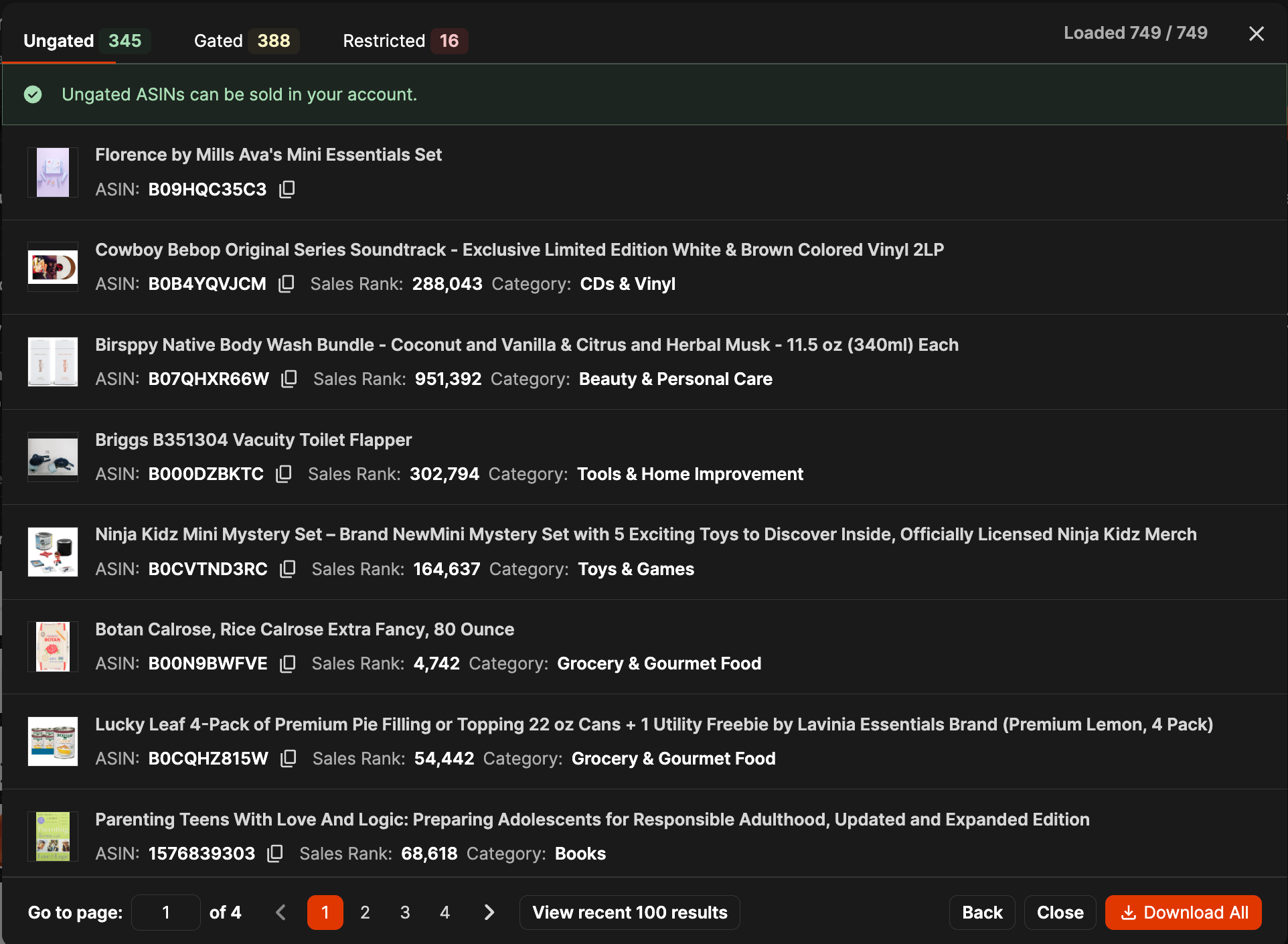
Boxem’s Bulk Ungate tool can scan through thousands of products and automatically unlock them on the seller's behalf. If an account has some age or a clean record, it is common to find 50 to 100 brands are approved for you just off the default list built into Boxem. This is the fastest way to get money back into your business so you can buy more stock sooner, rather than waiting days for a manual review.
The Buy 10 Rule: Securing the First Invoice
If a specific target brand can’t be auto-ungated, such as Crocs or Burt's Bees, the seller must follow Amazon’s approval requirements. This involves providing an invoice.
The word “invoice” should not be intimidating. For ungating purposes, a detailed order confirmation from the brand’s website or from a major retailer such as Target, Walmart, or Walgreens typically satisfies the requirement. And of course, an invoice from a legitimate wholesaler will work as well. Here’s a play-by-play:
- Find a low-cost item: Search Target.com for the brand. For example, look for something like a Burt's Bees Mini Lip Balm Set.
- Order exactly 10: Amazon’s required number is often ten. Buying 9 or 5 will not work; 10 units of the same item must be purchased.
- Verify the information: The name and address on the shipping and billing info must match the Amazon Seller account exactly. If the Amazon account is under a business name, the retail order should not be placed in a personal name.
- Submit the PDF: Once the email confirmation arrives, save it as a PDF. Use a clear file name like Burts_Bees_Invoice_May_2026.
This process usually opens the entire brand, although some specific ASINs might remain restricted for your account. These are typically the frequently counterfeited items in that brand that they want to protect.
Handling Denials Without Stress
Many new sellers give up after the first denial. Amazon might send a canned response stating the documentation is insufficient, leading some to assume the brand is permanently off-limits.
In the reality of e-commerce, it often takes multiple attempts. There are cases where three or four identical submissions are required before the system, or a reviewer finally clicks “Approve”.
What to Do if Amazon Says No
Why the Gating is Actually Beneficial
While it may feel like a headache initially, gating benefits you in the long run. In previous years, Amazon’s lack of restrictions allowed counterfeiters to flood the platform, leading to negative feedback and fewer repeat customers. These restrictions keep questionable sellers out, protecting inventory value and keeping the Buy Box healthy for legitimate sellers.
Rather than overthinking the technicalities, sellers should go into Boxem, run a bulk scan, and see which doors open today. For any products that can’t be auto-ungated, find those 10 units and start sourcing.
Interested in a more in-depth explanation of the ugating process? Check out the complete guide on YouTube, available to watch for free:
Subscribe to our Weekly Newsletter
No spam, notifications only about new products, updates.

Get Started Today,
Ship Smarter with Boxem
Boxem streamlines all operations so you can focus on what truly matters.
.png)